PII Data Types
PII Crawler currently supports the following PII data types. We plan to support all PII data types defined by CPPA.
U.S. Social Security Number (SSN)
9 digit numerical usually in the format NNN-NN-NNNN. The prefix used to have meaning but was removed in the randomization process June 25, 2011 where previously unassigned area numbers were introduced for assignment excluding area numbers 000, 666 and 900-999. There are three parts:
-
Area Number (NNN) - Initially assigned based on geographical regions, it indicated the state of application. Since 2011, it has been assigned randomly.
-
Group Number (NN) - This two-digit number ranges from 01 to 99 and is not assigned consecutively. It follows a specific issuing pattern for administrative purposes.
-
Serial Number (NNNN) - This four-digit number is assigned sequentially and can be consecutive.
-
Valid (this specific number is not): 078-05-1120
-
Not Valid: 666-12-1234
U.S. Employer Identification Number (EIN)
A business's federal tax number, nine digits written NN-NNNNNNN. The same
number is often stored without the hyphen, and PII Crawler reports it either
way.
Because nine bare digits are also the shape of a Social Security number, an unhyphenated number is only reported as an EIN when a nearby label says employer, such as "EIN" or "Employer Identification Number". Labels that name tax context in general, like "SSN" or "Tax ID", leave the number to the Social Security detector.
On a form that carries both numbers, such as a W-9, each number is reported under the label closest to it. Where the two are equally close, the number is reported as a Social Security number.
U.S. City, State, Zip Cluster (CSZ)
A cluster is a set of distinct pieces of data that by themselves don't represent much but when found or linked together can produce something meaningful.
90210 by itself doesn't mean much but when 90210 is found near the words Beverly Hills we know we have a city and zip code. PII Crawler uses this clustering method to find City, State, and Zip codes. We call this a city, state, zip cluster or CSZ.
Street Address
Meaningful street addresses are often found near CSZ clusters.
An address is a house number, a street name and a street type:
150 Carter Street, 2721 Lindsay Avenue, 6007 Applegate Lane. The street
name may itself be a number, as half of Oakland and Savannah write theirs, so
2604 13th Street and 1732 27th Avenue are addresses. A quadrant or a
direction written after the street type belongs to the address and is
reported with it, in either spelling: 1745 T Street Southeast and
4840 Reservoir Road NW.
A street with no street type at all, such as 570 Broadway, is not reported
as an address. The city, state and zip beside it are still found.
First Name
A name is reported when a known first name and a known last name appear
together, so John on its own is not a finding but John Smith is. The name
lists come from the US Census Bureau's published name frequencies and cover
roughly nine out of ten people in the United States. A name from outside that
population may not be recognised; if the people in your data are not covered,
add the names you care about as a terms list.
Both orders are found: John Smith and Smith, John, the second being how
spreadsheet and payroll exports usually write it. A middle initial between the
two is allowed, so John D. Smith is one finding. Only a comma separates the
two halves of Smith, John, so a name followed by a list of something else is
not read as a person.
Names are matched as written, including the capital inside a compound surname
and the apostrophe in an Irish one, so Sarah McDonald, Brian MacArthur,
Anne DeSoto and Kevin O'Brien are all found. JOHN SMITH and john smith
are not reported, because in real documents a name is capitalised and those
two shapes are usually a heading or an identifier. A run of month or weekday
names such as April May June is not a person either, though April Johnson
still is.
A name written with an accented letter, such as María Martínez or
Hans Müller, is not recognised. Add the names you need as a
terms list.
The city line of a postal address is not a person. Plenty of US towns are
named the way people are, so Golden Valley MN 55427 on a W-2 and
1184 Bellhaven Court, Allen Park MI 48101 on a shipping label used to be
reported as people called Golden Valley and Allen Court. A place standing in
front of its state or its ZIP code is read as a place. Somewhere that shares
its name with a real person is only skipped in that position, so Robert Lee
in a letter, or on the addressee line of a label, is still a person.
Nor is the street line above it. US streets are named after people, so
44 Delmar Ridge on a W-2G, 1895 Preston White Drive in a licence header
and 3162 Martin Luther King Junior Boulevard on a delivery list used to be
reported as people called Delmar Ridge, Preston White, and Martin Luther,
Luther King and King Junior — three from the one street. A name inside a
street address that has already been reported as an address is read as part
of the address. Somebody standing next to their own address, on the line
above it or in the column before it, is still a person.
The finding covers the whole name as the file writes it, which is what PII Identity Scan groups a person's data by when answering a data subject request.
Last Name
Last names are found as part of a full name. See First Name.
Date of Birth
PII Crawler detects date of birth using term lists and date recognition.
Email Address
PII Crawler detects email addresses in any standard format.
US Passport
Begins with a letter followed by eight numbers
Credit Card
PII Crawler checks candidate numbers for valid IIN prefixes, lengths, and a checksum digit.
The networks it knows are Visa, Mastercard (both the 51-55 range and the 2221-2720 range issued since 2017), American Express, Discover, JCB, Diners Club and UnionPay. Maestro is not included: its published range covers so many sixteen digit numbers that it would report order numbers as cards.
A number that passes those checks is only reported when something nearby says it is a card, such as the words "credit card", "Visa", or "CVV". That keeps order numbers and other long digit strings out of your results. In a spreadsheet or CSV export the label is the column header, so PII Crawler reads headers as context too. See Spreadsheets and CSV exports.
Driver's License
PII Crawler checks candidate numbers against valid DLN formats and reports the ones that appear near terms like "drivers license" or "driver's license".
NZ Inland Revenue Department Number (IRD)
Off by default. Enable in scan options if you need to detect New Zealand IRD Numbers.
NZ IRD Numbers are 8 or 9 digit identifiers issued by Inland Revenue and used as both personal and business tax IDs. They appear formatted with hyphens (XX-XXX-XXX or XXX-XXX-XXX) or as a flat run of digits. PII Crawler validates the official IRD modulo-11 checksum using the two-pass primary and secondary weight scheme.
AU Tax File Number (TFN)
Off by default. Enable in scan options if you need to detect Australian Tax File Numbers.
AU TFNs are 8 or 9 digit identifiers issued by the Australian Taxation Office. They are typically formatted as space-separated triplets (NNN NNN NNN or NNN NNN NN), or as a flat run of digits. PII Crawler validates the official ATO mod-11 checksum using the published weight sequences for both lengths.
DE Tax Identification Number (Steuer-ID)
Off by default. Enable in scan options if you need to detect German Tax Identification Numbers (Steuerliche Identifikationsnummer, "Steuer-ID" or "IdNr.").
DE Steuer-IDs are 11-digit identifiers issued by the Bundeszentralamt für Steuern. They appear as digit runs, space-separated groups (NN NNN NNN NNN), or hyphen-separated groups. PII Crawler validates the ISO 7064 MOD 11,10 check digit and enforces the official repetition rule on the first 10 digits (exactly one digit may appear two or three times; every other digit at most once).
NZ Passport Number
Off by default. Enable in scan options if you need to detect New Zealand passport numbers.
NZ passports issued from 2005 onwards (EA, LA, and RA biometric series) carry a number consisting of two uppercase letters followed by six digits (for example, LH615098). Pre-2005 passports used a one-letter, seven-digit format and have all expired given the ten-year adult validity, so PII Crawler matches the modern two-letter, six-digit form only. Detection requires a New Zealand passport context term such as "passport", "New Zealand passport", or "DIA" within 150 characters.
AU Passport Number
Off by default. Enable in scan options if you need to detect Australian passport numbers.
AU passports use either a single-letter prefix (N, E, D, F, A, C, U, or X) followed by seven digits, or a two-letter prefix beginning with P (PA, PB, PC, PD, PE, PF, PU, PW, PX, PZ) followed by seven digits. There is no published checksum, so detection requires a context term such as "passport", "Australian passport", or "DFAT" within 150 characters.
DE Passport (Reisepass) Number
Off by default. Enable in scan options if you need to detect German passport (Reisepass) numbers.
German passports issued from 2021-11-01 onwards use a nine-character alphanumeric document number. The first character is a letter and the remaining eight characters are drawn from the digits 1-9 and the letters C F G H J K L M N P R T V W X Y Z. The digit 0 and the letter O are deliberately excluded to avoid visual ambiguity (see Wikipedia: German passport). Detection requires a context term such as "Reisepass", "Passnummer", or "passport number" within 150 characters.
NZ Driver Licence Number
Off by default. Enable in scan options if you need to detect New Zealand driver licence numbers.
NZ driver licence numbers are eight characters: two uppercase letters followed by six digits (for example, BQ739482). The card-version code printed on the physical card is a separate three-digit reissue counter and is not part of the licence number. Detection requires a context term such as "driver licence", "drivers licence", "driver's licence", or "Waka Kotahi" (the NZ Transport Agency) within 150 characters.
The licence number shares its shape with the modern NZ passport pattern, so the same string can be reported as either type depending on the surrounding keywords. PII Crawler keeps the two detectors separate by matching only on licence-related terms here. Use the American spelling ("license") if you want the generic Driver's License detector to fire instead.
AU Driver Licence Number
Off by default. Enable in scan options if you need to detect Australian driver licence numbers.
Australia has no national format. Each state and territory issues its own scheme; PII Crawler matches the union of formats:
| Variant | States that use it |
|---|---|
| 6 to 10 digits | NSW (8), VIC (9), QLD (9), SA / WA / TAS (7), ACT (8 or 9), NT (6 or 7) |
| 1 letter + 5 digits | older licences |
| 2 letters + 4 digits | older licences |
| 4 digits + 2 letters | older NSW (pre-1990s) |
No state publishes a checksum, so detection relies on context. A licence-related term such as "driver licence", "drivers licence", "driver's licence", or "Australian Automobile Association" must appear within 150 characters.
DE Driver Licence Number (Führerscheinnummer)
Off by default. Enable in scan options if you need to detect German driver licence numbers (Führerscheinnummer).
German driver licence numbers are exactly 11 alphanumeric characters with a fixed positional structure:
- Position 1: state authority code (a letter from
Afor Baden-Württemberg throughPfor Thuringia, or a digit). - Positions 2 to 3: district code (two digits).
- Positions 4 to 9: sequential number (six digits or letters; letters appear once a district passes one million issued licences).
- Position 10: check digit (
0to9, orXwhen the modulo-11 remainder is 10). - Position 11: issue number (digit, then
AtoZafter the tenth re-issue).
For example, B072RRE2I55 is a Bavarian licence in district 07 with sequential number 2RRE2I, check digit 5, and issue number 5. PII Crawler validates the published modulo-11 checksum using weights 9 down to 1 over positions 1 through 9, with letters scored as alphabet position plus nine (so A is 10, B is 11, and Z is 35). A context term such as "Führerschein", "Führerscheinnummer", "Fahrerlaubnis", or the English "driver licence" must appear within 150 characters.
AWS Credentials
PII Crawler recognises AWS credentials by their unique ID prefixes.
Spreadsheets and CSV exports
Credit card and phone number detection needs a label nearby, because a bare run of digits is just as likely to be an order number or an account balance. In prose that label sits right next to the value ("Credit card: 4111 1111 1111 1111"). In a spreadsheet or a CSV export it does not: the label is the column header at the top of the file, and the values run for thousands of rows beneath it.
PII Crawler reads column headers as context for the whole column. In this export:
name,email,ssn,phone,credit_card,exp
Hiroshi Tanaka,[email protected],123-45-6789,415-555-0142,4111111111111111,03/28
Maria Alvarez,[email protected],987-65-4321,206-555-0119,5555555555554444,11/27
every card is reported because the credit_card header labels the column, and every phone number is reported because of the phone header. Headers written as creditCard or CardNumber are recognised too.
This applies to .csv and .tsv files, to .xlsx, .xls, and .ods spreadsheets, and to any text laid out as rows and columns, including tables inside emails and documents. Comma, tab, semicolon, and pipe delimiters are all recognised, and quoted fields containing the delimiter are handled. A sheet holding several tables separated by a blank row gets a header per table. The file size does not matter: a multi-gigabyte export is read the same way as a small one.
Columns lined up with spaces count too, which is how a report writer, a COBOL or SAP export, and psql's plain output lay out a table:
name            credit_card       ssn
--------------  ----------------  -----------
Hiroshi Tanaka  4111111111111111  123-45-6789
Maria Alvarez   5555555555554444  987-65-4321
A run of two or more spaces separates one column from the next, so a value with a single space inside it (Hiroshi Tanaka, New York) stays whole. The ruler under the headings is read as an ordinary row and simply holds nothing.
For a column to count as labelled, the file needs a header row plus at least two data rows, and most rows must have the same number of cells as the header. A row with the wrong number of cells is skipped rather than guessed at, so a malformed line never shifts the columns of the rows around it.
A title above the table is allowed for. A database table dumped to text carries its name on the line above the column names, and reports and exports often carry a heading there, so if the first line of a block is not a header row the line under it is tried instead. The same goes for a title that does not look like one: a spreadsheet is saved as its used range, so a heading typed into the first cell is written out with an empty cell for every other column, which is a row of exactly the right width. A row that leaves most of its columns unnamed is a heading rather than a header, and a heading block that runs to several rows — a title and the date it was generated, say — is read past in full.
A labelled column is taken at its word. Elsewhere a card number is rejected when it sits in a run of unrelated digits, on the grounds that it is probably part of one; in a column headed credit_card the neighbouring columns of the same record are meant to be a phone number, an account number or a date of birth, and their digits no longer count against the card beside them.
If your export has no header row, or uses column names PII Crawler does not recognise, add the term to a custom regex proximity group or rename the column before scanning.
Custom Regex
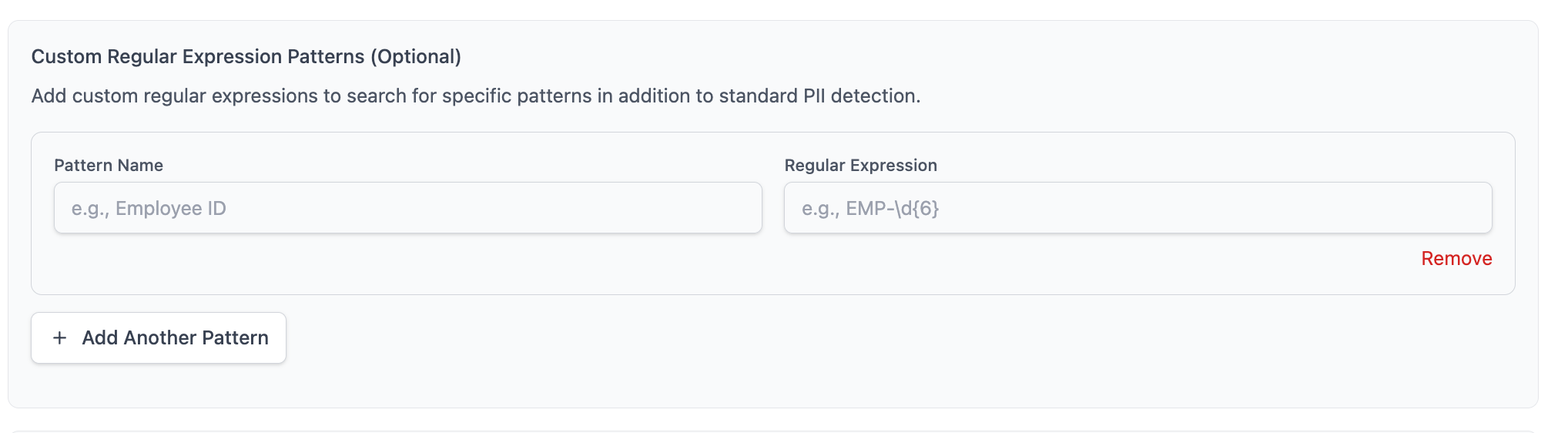
You can specify your own custom regex rules to match your specific data types. Simply add them in the scan options when creating a new scan:
Which patterns a scan runs with
Saved patterns are shared across scans, and each scan records the ones it ran with.
In the web UI, the Custom Regex panel of the New Scan form starts with every saved pattern selected, so a new scan looks for all of them. Untick the ones you do not want, or use Clear to run a scan with none. The scan page shows the patterns the scan actually ran with, and re-running or resuming that scan uses the same set, so adding or deleting a pattern later never changes what a scan already started with.
In the TUI, a scan applies every pattern in your library. There is no per-scan selection, and the patterns are recorded on the scan the same way.
On the command line, saved patterns are not applied. Pass the pattern with --regex 'label=pattern' instead; see the CLI reference. A --regex pattern used with --save is recorded on that scan, so resuming or re-running it keeps looking for the same thing, and the scan page lists the pattern with a --regex tag to show it came from the command line rather than your saved rules.