PII Data Types
PII Crawler currently supports the following PII data types. We plan to support all PII data types defined by CPPA.
U.S. Social Security Number (SSN)
9 digit numerical usually in the format NNN-NN-NNNN. The prefix used to have meaning but was removed in the randomization process June 25, 2011 where previously unassigned area numbers were introduced for assignment excluding area numbers 000, 666 and 900-999. There are three parts:
-
Area Number (NNN) - Initially assigned based on geographical regions, it indicated the state of application. Since 2011, it has been assigned randomly.
-
Group Number (NN) - This two-digit number ranges from 01 to 99 and is not assigned consecutively. It follows a specific issuing pattern for administrative purposes.
-
Serial Number (NNNN) - This four-digit number is assigned sequentially and can be consecutive.
-
Valid (this specific number is not): 078-05-1120
-
Not Valid: 666-12-1234
A number written with dashes (078-05-1120) is reported wherever it appears. Nine digits with no dashes (078051120) could just as easily be an order or account number, so they are only reported when a label nearby says SSN. PII Crawler recognises labels such as SSN, SSN#, SS#, SS No, Social Security, Soc Sec, Tax ID, Taxpayer ID and TIN.
SSNs in spreadsheets
Spreadsheets often store SSNs as numbers and only display the dashes through cell formatting. The cell shows 012-34-5678, but the value saved in the file is 12345678, without the dashes or the leading zero. In a column whose header names an SSN, PII Crawler reports these numbers on every row of the sheet, including the seven- and eight-digit values left behind by a dropped leading zero. The finding shows the value as it is stored in the file, so 012-34-5678 appears as 12345678. See Spreadsheets and CSV exports for how columns are recognised.
U.S. Employer Identification Number (EIN)
A business's federal tax number, nine digits written NN-NNNNNNN. The same
number is often stored without the hyphen, and PII Crawler reports it either
way.
Because nine bare digits are also the shape of a Social Security number, an unhyphenated number is only reported as an EIN when a nearby label says employer, such as "EIN" or "Employer Identification Number". Labels that name tax context in general, like "SSN" or "Tax ID", leave the number to the Social Security detector.
On a form that carries both numbers, such as a W-9, each number is reported under the label closest to it. Where the two are equally close, the number is reported as a Social Security number.
U.S. City, State, Zip Cluster (CSZ)
A cluster is a set of distinct pieces of data that by themselves don't represent much but when found or linked together can produce something meaningful.
90210 by itself doesn't mean much but when 90210 is found near the words Beverly Hills we know we have a city and zip code. PII Crawler uses this clustering method to find City, State, and Zip codes. We call this a city, state, zip cluster or CSZ.
Street Address
Meaningful street addresses are often found near CSZ clusters.
An address is a house number, a street name and a street type:
150 Carter Street, 2721 Lindsay Avenue, 6007 Applegate Lane. The street
name may itself be a number, as half of Oakland and Savannah write theirs, so
2604 13th Street and 1732 27th Avenue are addresses. A quadrant or a
direction written after the street type belongs to the address and is
reported with it, in either spelling: 1745 T Street Southeast and
4840 Reservoir Road NW.
A street with no street type at all, such as 570 Broadway, is not reported
as an address. The city, state and zip beside it are still found.
First Name
A name is reported when a known first name and a known last name appear
together, so in a file that never names him in full, John on its own is not
a finding but John Smith is. A name held in a labelled field is the
exception, and is reported however it is written (see
Names in columns and labelled fields). The name
lists come from the US Census Bureau's published name frequencies, which cover
roughly nine out of ten people in the United States, and from a worldwide list
of given and family names, so Chinedu Okonkwo and Priya Raghunathan are
found as well as John Smith. A name from the worldwide list is not paired
with a surname that is also an everyday word, so Hwang Garden is not read as
a person. Surname-first Smith, John is only read for names on the US lists.
If the people in your data are still not covered, add the names you care about
as a terms list.
Both orders are found: John Smith and Smith, John, the second being how
spreadsheet and payroll exports usually write it. A middle initial between the
two is allowed, so John D. Smith is one finding. Only a comma separates the
two halves of Smith, John, so a name followed by a list of something else is
not read as a person.
Names are matched as written, including the capital inside a compound surname
and the apostrophe in an Irish one, so Sarah McDonald, Brian MacArthur,
Anne DeSoto and Kevin O'Brien are all found. JOHN SMITH and john smith
are not reported, because in real documents a name is capitalised and those
two shapes are usually a heading or an identifier. A run of month or weekday
names such as April May June is not a person either, though April Johnson
still is.
A name written with an accented letter, such as María Martínez or
Hans Müller, is not recognised. Add the names you need as a
terms list.
The city line of a postal address is not a person. Plenty of US towns are
named the way people are, so Golden Valley MN 55427 on a W-2 and
1184 Bellhaven Court, Allen Park MI 48101 on a shipping label used to be
reported as people called Golden Valley and Allen Court. A place standing in
front of its state or its ZIP code is read as a place. Somewhere that shares
its name with a real person is only skipped in that position, so Robert Lee
in a letter, or on the addressee line of a label, is still a person.
Nor is the street line above it. US streets are named after people, so
44 Delmar Ridge on a W-2G, 1895 Preston White Drive in a licence header
and 3162 Martin Luther King Junior Boulevard on a delivery list used to be
reported as people called Delmar Ridge, Preston White, and Martin Luther,
Luther King and King Junior — three from the one street. A name inside a
street address that has already been reported as an address is read as part
of the address. Somebody standing next to their own address, on the line
above it or in the column before it, is still a person.
Public records add more places named like people, and these are not reported
either: a name followed by an organisation or building word
(Mount Vernon Police Department, Margaret Pratt House, Kirby Park
in a list of parks), a street with a house number or a street suffix
(5630 N. Lincoln Ave., Roland Ave.), a saint's name (St. Joseph School,
while Mr St John Smith is still a person), a town after Village of or
City of, and a town cell straight after a street cell in an export, such as
12 Oak Street,Allen Park,MI. In a comma-separated line with no spaces, such
as Brooklyn,Windsor Terrace,Kim Raccio, the comma divides fields, so
Terrace,Kim is not read as a surname and a given name.
Once a file names someone in full, the rest of that file is read for them by
one name too. A letter that opens with Mary Jones and goes on to say
Jones approved the transfer and Mary's reply reports Jones and Mary
as names as well, so redacting the file's findings leaves none of them
behind. Only the names of people the file has already named in full are
reported this way, written the same way, so a Jones in a file that never
mentions a Jones in full is not a finding, and neither is JONES or
jones. The word is not reported where it names something else: in front
of a word such as County, Street, Hospital or Inc (Wayne County,
Reed Hospital), in front of a state (Mitchell, SD 57301), inside a
street address, or as part of an email address, a file path or a user name.
A month that is also a given name is not spread either, so a file about
April Johnson still reports Johnson on its own but not every April.
A person written with one name is also found when the words around the name
say it is a person: an honorific (Mr. Okonkwo, Dr Patel), a title or
public office (Senator Hwang, Councilmember Zablocki, also when typed as
Concilmember), a greeting at the start of a line (Dear Priya,,
Thanks, Priya!), or a word such as said, told or asked (Hwang said,
"Not yet," said Hwang.). After an honorific the name does not have to be
on any name list, but an ordinary word is not taken for one, so
Mr. President is not a finding. After the other words the name has to be
on the lists, and not one that is mostly an everyday word or the name of a
well-known place or company, so Judge Will decide and Councilmember Ford
are not findings. The cue word and the name have to be on the same line. A
unit after a street (Academy Dr. Suite 300) and a place named after a
person (Lt. Michael R. Davidson Playground) are not reported.
These single-name findings are counted and redacted like any other name.
PII Identity Scan still groups data by the full
name only, because Jones on its own does not say which Jones.
Names are also found on lines written entirely in capitals or entirely in
lower case, such as a court caption (PLAINTIFF DAVID Q. OKAFOR), an
upper-cased export, or a chat line (cc: david johnson). On these lines a
first and last name are reported, with or without a middle initial, and so
is a last name written first (JOHNSON, PRIYA) and a name after an
honorific (MR. OKAFOR). Without capital letters to go on, both words have
to be names more than anything else: we will mark the box is not a
finding, and in lower case neither is billy martin, because martin is
also a bird, while BILLY MARTIN in capitals is. Places written like
people are not reported: SANTA CLARA, JOHN MARSHALL HOUSE,
MARTIN LUTHER KING JR BLVD, a street after a house number, a city before
its state, and a company or trust in a spreadsheet cell
(DAVID MARTIN TRUST). A word found this way is also reported on its own on
the file's other all-capitals or all-lower-case lines (OKAFOR APPEARED).
On lines of program code only the quoted strings and comments are read
this way, so def handler(self): and elif node: in a source file are not
names, while log("refund for mary okafor") and a lower-case code comment
(# reviewed by david johnson) still are.
The finding covers the whole name as the file writes it, which is what PII Identity Scan groups a person's data by when answering a data subject request.
Names in columns and labelled fields
Exports rarely write a name the way prose does. A CRM or HR export keeps the first and last name in separate columns, a JSON record keeps them under separate keys, and an older system writes them in capitals. PII Crawler reads the label instead. In this export:
EmployeeID  GivenName   Surname Department
E501    Levan   Rossi   Finance
E502    Marinela    Hjelmstad   Legal
E503    GAIL    ESCOBAR Sales
every given name and surname is reported, one finding per cell, including names that are not on the name lists and names in capitals. The same goes for labelled values elsewhere in a file:
- JSON and similar records:
"first_name": "Bidane","familyName": "Eliott" - form and header lines:
Applicant Name: Moloud Holley,From: Mary Ortega <[email protected]> - key-value pairs in logs and configs:
by="Giani Lehew",owner: Hsiu House
Labels that name a person's name (first_name, Last Name, Surname,
givenName, Contact Name, displayName) are trusted on their own. Labels
that name a role (Customer, Owner, Physician, Assigned To, By) are
trusted when the values under them read as people: capitalised like names,
mostly known first names or surnames, and not company names such as
Acme Corp or Carter Bank. A column headed just name needs most of its
values to read as people. A title in front of a name is left out of the
finding, so Dr. Vernon Lowitz is reported as Vernon Lowitz.
Public records are read the same way. Property tax rolls, licence and
permit lists, campaign filings, payrolls and council votes label their people
as owners, taxpayers, licensees, contributors, inspectors, voters and the
like, often numbered (owner_name1, property_owner_2,
additional_owner_1_first) or run together (namefirst,
primaryprincipalname). Any short label with the word "name" in it, such as
name_as_shown_on_your_notary, counts as a name column when its values read
as people, and a long label that ends in a person's name, such as
in_house_lobbyist_last_name, is a name column like last_name. Bill
sponsors and motion movers and seconders (primary_sponsor, motion_mover)
are read as people too, and so are the people met or lobbied in meeting and
lobbying records (attendees, lobbyist_employees, person_lobbied,
official_contacted), and columns headed by a job, such as principal,
coach, superintendent, inspector or administrator, when most of
their values read as people. Inside such columns:
-
several people listed in one cell,
LARRY SUFFREDIN, DENNIS DEER,M. Ortega; Dennis DeerorJacob Mnookin/Evan Burns, are one finding each, as long as every part of the list reads as a person; a list with a company in it is left whole; -
an initial before a surname, as in
A. Knack, counts as a name; -
once a column reads as people, a first name the name lists don't know, as in
Jonea Thomas, counts too when a known surname follows it and it is not an everyday word, a title or an office (Grand HillandRep Thomasare not read); so does a first name known only from the worldwide lists, as inEsosa Ogbahon; -
two owners in one cell,
ROBERT & ANDREA LUNSFORD, are two findings; -
a tenancy note after the owner, such as
J/TorET AL, is left out; -
a name written surname first with one comma, as in
SCHNEIDER, RODNEY W, is one person rather than a list of two; -
surname-first owners such as
NGUYEN THANH, andLEMON, MOSE H, JRorBRANCH,DARRIN,TODDwith two commas, are read as names; -
a company among the people, such as
HAYES PLUMBING LLC, is skipped on its own and the people around it are still reported, and forJOHN MILLER DBA MILLER PLUMBINGonlyJOHN MILLERis; -
an owner column where companies make up close to half the values, such as a parcel list mixing
REED THOMASwithRISING STAR PROPERTIES LLCandCITY OF HARTFORD, still has its people reported; there only values of two words or more made of name-like words count, so a loneDUNLOPis not reported; -
a provider column that lists home childcare providers beside centres and schools, such as
LINDA COLLINSbesideTENDER CARE LEARNING ACADEMY, also has its people reported; values naming a care, school or childcare facility (academy, center, school, montessori, …) are left out, and a column labelled justnameis not read this way, since it may list parks or landmarks; -
cells such as
No Contact,UnknownorNULLare not names; -
an office in front of a name, as in
Senator Jamie Raskin,Public Advocate WilliamsorWarden James Fuller, is left out like a title, and so is one after a dash or a comma, as inA. Knack - CouncillororTom Vo, Interim CEO; -
a phone number or e-mail address after the name, as in
Aaron Hagel|512-783-7074or a bareAaron Hagel|, is left out and the name is still reported; -
the initials in a middle name or middle initial column (
middle_name,owner_mi) are reported beside the first and last names.
Columns named for things, such as product_name, company_name or
user_name, are not read as people, however name-like their values look.
Neither are columns named for places, such as city, street_name or
municipality_name: a town called Morton Grove or Allen Park in such a
column is not reported as a person, by the label or by the pairing rule. The
same goes for columns named for schools, sites, firms, agencies, employers
and neighbourhoods, such as location_name, nta_name, lobbyist_firm or
agency: a school called Thurgood Marshall Academy or a law firm called
Paul Hastings is not a person. A column for the people of such a place,
such as property_owner or agency_contact, is still read.
Columns are found the same way as for spreadsheets and CSV
exports, so a table needs a header row. A
table with no header row only reports the names the pairing rule above finds.
These findings are reported for redaction. A first name and a surname in separate columns are two findings and do not add a person to PII Identity Scan; a full name written in one place still does.
Last Name
Last names are found as part of a full name, on their own in a file that has
already named the person in full, and on their own in a labelled field such as
a last_name or Surname column. See First Name.
Date of Birth
PII Crawler detects date of birth using term lists and date recognition.
Email Address
PII Crawler detects email addresses in any standard format.
US Passport
Begins with a letter followed by eight numbers
Credit Card
PII Crawler checks candidate numbers for valid IIN prefixes, lengths, and a checksum digit.
The networks it knows are Visa, Mastercard (both the 51-55 range and the 2221-2720 range issued since 2017), American Express, Discover, JCB, Diners Club and UnionPay. Maestro is not included: its published range covers so many sixteen digit numbers that it would report order numbers as cards.
A number that passes those checks is only reported when something nearby says it is a card, such as the words "credit card", "Visa", or "CVV". That keeps order numbers and other long digit strings out of your results. In a spreadsheet or CSV export the label is the column header, so PII Crawler reads headers as context too. See Spreadsheets and CSV exports.
Driver's License
PII Crawler checks candidate numbers against valid DLN formats and reports the ones that appear near terms like "drivers license" or "driver's license".
NZ Inland Revenue Department Number (IRD)
Off by default. Enable in scan options if you need to detect New Zealand IRD Numbers.
NZ IRD Numbers are 8 or 9 digit identifiers issued by Inland Revenue and used as both personal and business tax IDs. They appear formatted with hyphens (XX-XXX-XXX or XXX-XXX-XXX) or as a flat run of digits. PII Crawler validates the official IRD modulo-11 checksum using the two-pass primary and secondary weight scheme.
AU Tax File Number (TFN)
Off by default. Enable in scan options if you need to detect Australian Tax File Numbers.
AU TFNs are 8 or 9 digit identifiers issued by the Australian Taxation Office. They are typically formatted as space-separated triplets (NNN NNN NNN or NNN NNN NN), or as a flat run of digits. PII Crawler validates the official ATO mod-11 checksum using the published weight sequences for both lengths.
DE Tax Identification Number (Steuer-ID)
Off by default. Enable in scan options if you need to detect German Tax Identification Numbers (Steuerliche Identifikationsnummer, "Steuer-ID" or "IdNr.").
DE Steuer-IDs are 11-digit identifiers issued by the Bundeszentralamt für Steuern. They appear as digit runs, space-separated groups (NN NNN NNN NNN), or hyphen-separated groups. PII Crawler validates the ISO 7064 MOD 11,10 check digit and enforces the official repetition rule on the first 10 digits (exactly one digit may appear two or three times; every other digit at most once).
NZ Passport Number
Off by default. Enable in scan options if you need to detect New Zealand passport numbers.
NZ passports issued from 2005 onwards (EA, LA, and RA biometric series) carry a number consisting of two uppercase letters followed by six digits (for example, LH615098). Pre-2005 passports used a one-letter, seven-digit format and have all expired given the ten-year adult validity, so PII Crawler matches the modern two-letter, six-digit form only. Detection requires a New Zealand passport context term such as "passport", "New Zealand passport", or "DIA" within 150 characters.
AU Passport Number
Off by default. Enable in scan options if you need to detect Australian passport numbers.
AU passports use either a single-letter prefix (N, E, D, F, A, C, U, or X) followed by seven digits, or a two-letter prefix beginning with P (PA, PB, PC, PD, PE, PF, PU, PW, PX, PZ) followed by seven digits. There is no published checksum, so detection requires a context term such as "passport", "Australian passport", or "DFAT" within 150 characters.
DE Passport (Reisepass) Number
Off by default. Enable in scan options if you need to detect German passport (Reisepass) numbers.
German passports issued from 2021-11-01 onwards use a nine-character alphanumeric document number. The first character is a letter and the remaining eight characters are drawn from the digits 1-9 and the letters C F G H J K L M N P R T V W X Y Z. The digit 0 and the letter O are deliberately excluded to avoid visual ambiguity (see Wikipedia: German passport). Detection requires a context term such as "Reisepass", "Passnummer", or "passport number" within 150 characters.
NZ Driver Licence Number
Off by default. Enable in scan options if you need to detect New Zealand driver licence numbers.
NZ driver licence numbers are eight characters: two uppercase letters followed by six digits (for example, BQ739482). The card-version code printed on the physical card is a separate three-digit reissue counter and is not part of the licence number. Detection requires a context term such as "driver licence", "drivers licence", "driver's licence", or "Waka Kotahi" (the NZ Transport Agency) within 150 characters.
The licence number shares its shape with the modern NZ passport pattern, so the same string can be reported as either type depending on the surrounding keywords. PII Crawler keeps the two detectors separate by matching only on licence-related terms here. Use the American spelling ("license") if you want the generic Driver's License detector to fire instead.
AU Driver Licence Number
Off by default. Enable in scan options if you need to detect Australian driver licence numbers.
Australia has no national format. Each state and territory issues its own scheme; PII Crawler matches the union of formats:
| Variant | States that use it |
|---|---|
| 6 to 10 digits | NSW (8), VIC (9), QLD (9), SA / WA / TAS (7), ACT (8 or 9), NT (6 or 7) |
| 1 letter + 5 digits | older licences |
| 2 letters + 4 digits | older licences |
| 4 digits + 2 letters | older NSW (pre-1990s) |
No state publishes a checksum, so detection relies on context. A licence-related term such as "driver licence", "drivers licence", "driver's licence", or "Australian Automobile Association" must appear within 150 characters.
DE Driver Licence Number (Führerscheinnummer)
Off by default. Enable in scan options if you need to detect German driver licence numbers (Führerscheinnummer).
German driver licence numbers are exactly 11 alphanumeric characters with a fixed positional structure:
- Position 1: state authority code (a letter from
Afor Baden-Württemberg throughPfor Thuringia, or a digit). - Positions 2 to 3: district code (two digits).
- Positions 4 to 9: sequential number (six digits or letters; letters appear once a district passes one million issued licences).
- Position 10: check digit (
0to9, orXwhen the modulo-11 remainder is 10). - Position 11: issue number (digit, then
AtoZafter the tenth re-issue).
For example, B072RRE2I55 is a Bavarian licence in district 07 with sequential number 2RRE2I, check digit 5, and issue number 5. PII Crawler validates the published modulo-11 checksum using weights 9 down to 1 over positions 1 through 9, with letters scored as alphabet position plus nine (so A is 10, B is 11, and Z is 35). A context term such as "Führerschein", "Führerscheinnummer", "Fahrerlaubnis", or the English "driver licence" must appear within 150 characters.
AWS Credentials
PII Crawler recognises AWS credentials by their unique ID prefixes.
Spreadsheets and CSV exports
Credit card, phone number, and undashed SSN detection needs a label nearby, because a bare run of digits is just as likely to be an order number or an account balance. In prose that label sits right next to the value ("Credit card: 4111 1111 1111 1111"). In a spreadsheet or a CSV export it does not: the label is the column header at the top of the file, and the values run for thousands of rows beneath it.
PII Crawler reads column headers as context for the whole column. In this export:
name,email,ssn,phone,credit_card,exp
Hiroshi Tanaka,[email protected],123-45-6789,415-555-0142,4111111111111111,03/28
Maria Alvarez,[email protected],987-65-4321,206-555-0119,5555555555554444,11/27
every card is reported because the credit_card header labels the column, and every phone number is reported because of the phone header. Headers written as creditCard or CardNumber are recognised too. The same goes for an ssn column whose values have no dashes: see SSNs in spreadsheets.
This applies to .csv and .tsv files, to .xlsx, .xls, and .ods spreadsheets, and to any text laid out as rows and columns, including tables inside emails and documents. Comma, tab, semicolon, and pipe delimiters are all recognised, and quoted fields containing the delimiter are handled. A sheet holding several tables separated by a blank row gets a header per table. The file size does not matter: a multi-gigabyte export is read the same way as a small one.
Columns lined up with spaces count too, which is how a report writer, a COBOL or SAP export, and psql's plain output lay out a table:
name            credit_card       ssn
--------------  ----------------  -----------
Hiroshi Tanaka  4111111111111111  123-45-6789
Maria Alvarez   5555555555554444  987-65-4321
A run of two or more spaces separates one column from the next, so a value with a single space inside it (Hiroshi Tanaka, New York) stays whole. The ruler under the headings is read as an ordinary row and simply holds nothing.
For a column to count as labelled, the file needs a header row plus at least two data rows, and most rows must have the same number of cells as the header. A row with the wrong number of cells is skipped rather than guessed at, so a malformed line never shifts the columns of the rows around it.
A title above the table is allowed for. A database table dumped to text carries its name on the line above the column names, and reports and exports often carry a heading there, so if the first line of a block is not a header row the line under it is tried instead. The same goes for a title that does not look like one: a spreadsheet is saved as its used range, so a heading typed into the first cell is written out with an empty cell for every other column, which is a row of exactly the right width. A row that leaves most of its columns unnamed is a heading rather than a header, and a heading block that runs to several rows — a title and the date it was generated, say — is read past in full.
A labelled column is taken at its word. Elsewhere a card number is rejected when it sits in a run of unrelated digits, on the grounds that it is probably part of one; in a column headed credit_card the neighbouring columns of the same record are meant to be a phone number, an account number or a date of birth, and their digits no longer count against the card beside them.
Name columns are read from their headers too: see Names in columns and labelled fields.
If your export has no header row, or uses column names PII Crawler does not recognise, add the term to a custom regex proximity group or rename the column before scanning.
Custom Regex
You can specify your own custom regex rules to match your specific data types. Simply add them in the scan options when creating a new scan:
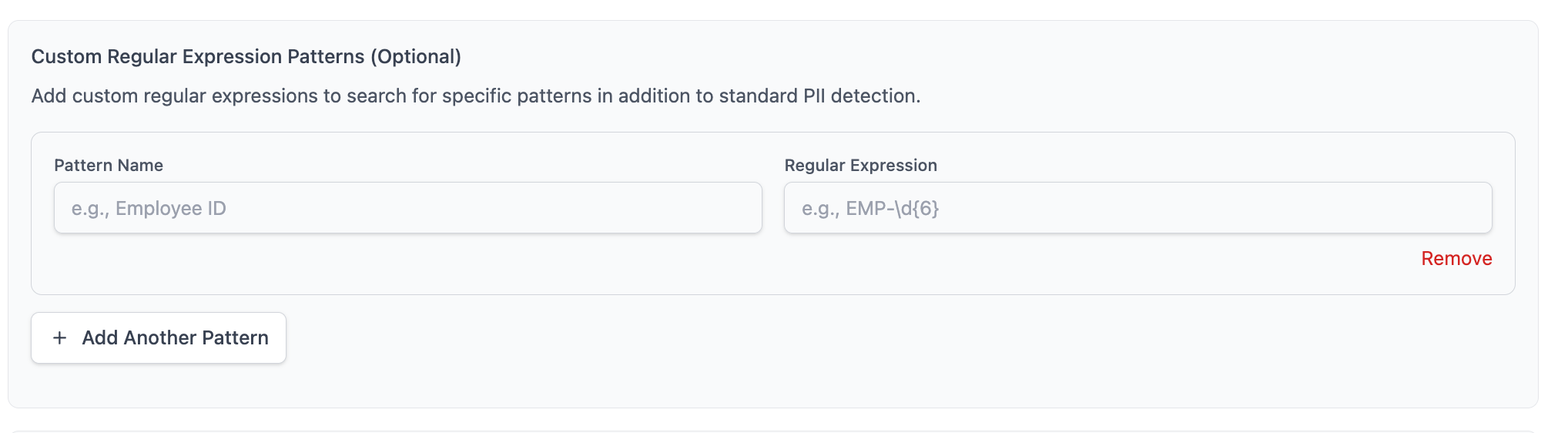
Which patterns a scan runs with
Saved patterns are shared across scans, and each scan records the ones it ran with.
In the web UI, the Custom regex panel of the New scan form starts with every saved pattern selected, so a new scan looks for all of them. Untick the ones you do not want, or use Clear to run a scan with none. The scan page shows the patterns the scan actually ran with, and re-running or resuming that scan uses the same set, so adding or deleting a pattern later never changes what a scan already started with.
In the TUI, a scan applies every pattern in your library. There is no per-scan selection, and the patterns are recorded on the scan the same way.
On the command line, saved patterns are not applied. Pass the pattern with --regex 'label=pattern' instead; see the CLI reference. A --regex pattern used with --save is recorded on that scan, so resuming or re-running it keeps looking for the same thing, and the scan page lists the pattern with a --regex tag to show it came from the command line rather than your saved rules.
Use your patterns on another computer
Saved patterns live on the computer where you created them. They are not tied to your license, so a colleague scanning from another computer starts with an empty library. To give them yours, export the patterns to a file and have them import it.
Web UI: on the Custom regex page, click Export to download piicrawler-regex-patterns.json. On the other computer, open the same page, click Import and choose the file.
TUI: in Settings / Custom patterns, press e to export and choose where to save the file. On the other computer press i, type the path to the file and press Enter.
Command line: piicrawler patterns export --out patterns.json, then piicrawler patterns import patterns.json on the other computer. See the CLI reference.
The file holds each pattern's name, regex and description, and nothing about your scans or findings, so it is safe to email. Importing adds to the patterns already there rather than replacing them. A pattern with the same name and regex as one already saved is skipped, so importing the same file twice does no harm. A pattern whose regex is not valid is left out and named in the import result; the rest still import.